The 2023 Planner Notebook Interior Journal: A Digital Toolkit for Customization and Productivity
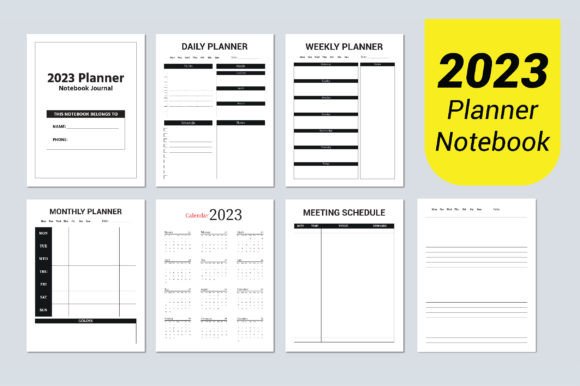
In the world of personal organization and creative productivity, the planner notebook stands as a timeless tool. For many, however, the physical notebook is limited by its static nature; once bound, its layout, color, and design are fixed. This limitation has given rise to a powerful digital alternative: the 2023 Planner Notebook Interior Journal. This is not a physical product but a comprehensive digital file package designed for creators, professionals, and anyone seeking to craft a perfectly tailored planning system. Its specifications—an 8.5×11 inch format, AI and EPS vector files, and print-ready quality—represent a bridge between digital flexibility and physical utility.
Understanding the Core Specifications and Their Impact
The listed details of this digital interior journal are more than just technical bullet points; they are the keys to its functionality. Each specification serves a distinct purpose in enabling customization and professional output.
The Significance of Dimensions and File Formats
The 8.5×11 inch dimension is the standard US letter size, a widely accepted format for printing and binding. This choice ensures compatibility with common home printers, professional print services, and readily available binder sizes. The inclusion of multiple file types—AI, EPS, 7 JPG, and PDF—addresses different user needs and software proficiencies. The AI and EPS files are fully editable vector formats, primarily used with Adobe Illustrator. These are the core files for deep customization. The JPG files offer quick, high-resolution previews or potential use in simpler software, while the PDF provides a stable, print-ready version for immediate use without modification.
What "Fully Editable Vector" Means for the User
The phrase fully editable vector is the cornerstone of this product's value. Unlike a raster image (like a standard JPG), a vector graphic is built from mathematical paths and points. This means every element—lines, shapes, text boxes, icons—can be resized, recolored, rearranged, or deleted without any loss of quality. The mention of 100 vector shapes that are resizable highlights the toolkit approach. These shapes are likely the modular components of the planner: calendars, checklists, note boxes, trackers, and decorative elements. A user can scale a monthly calendar to fit a different page layout or enlarge a habit tracker without pixelation, thanks to the 300 dpi high-quality baseline.
Primary Advantages and User Empowerment
The advantages of such a digital interior journal stem directly from its technical makeup. The benefits are practical and empower the end-user in several key areas.
Unmatched Customization and Personalization
The most evident advantage is the capacity for deep customization. The promise of easy to change colors and editable vectors means a user can align the planner’s aesthetics perfectly with their personal taste or brand identity. A professional might transform the palette to corporate colors, while a student might opt for brighter, motivational schemes. Beyond color, the structure itself is malleable. Pages can be added, removed, or reordered. Sections irrelevant to one’s workflow can be omitted, while crucial templates can be duplicated. This creates a truly personalized planning system, moving beyond the generic layouts of mass-produced planners.
From Digital Design to Physical Product: Print-Ready Utility
The no bleed specification and print-ready file status are crucial for users intending to produce a physical notebook. "No bleed" means the design elements do not extend to the edge of the page, which simplifies printing, especially on home devices where precise edge-to-edge printing can be challenging. Combined with the 300 dpi resolution, the user can output pages that are sharp and professional. This allows for on-demand printing: a user can print a month’s pages, test them, make adjustments in the vector file, and reprint—a cycle impossible with a pre-bound book. It supports sustainable practices like printing only what’s needed or using recycled paper.
Diverse Applications and User Scenarios
The utility of the 2023 Planner Notebook Interior Journal extends across a broad spectrum of users, each applying the toolkit to their unique context.
For Creators, Designers, and Small Business Owners
This group leverages the journal as both a personal tool and a commercial product. Graphic designers can use the AI/EPS files to rapidly prototype and produce custom client-branded planners. Small business owners, particularly in coaching, consulting, or creative fields, can create unique planners as merchandise or as complimentary tools for their clients. The editable nature means they can imprint their logo, brand fonts, and specific motivational quotes throughout the design, turning a generic planner into a branded experience.
For Educators, Researchers, and Project Managers
These users often require specialized tracking systems beyond a simple calendar. An educator might customize pages to include lesson planning grids, student progress trackers, and semester goal pages. A researcher could adapt the vector shapes to create lab notebook templates, experiment logs, or citation trackers. Project managers can build sections dedicated to Gantt-chart-like timelines, stakeholder contact pages, and risk assessment matrices. The 8.5×11 size provides ample space for such complex data layouts.
For Hobbyists and General Consumers Seeking Efficiency
Even for personal use without commercial intent, the digital journal offers a path to efficiency. A hobbyist gardener can create pages for plant watering schedules, harvest logs, and seed inventory. A traveler can design a pre-trip checklist, itinerary pages, and budget trackers tailored to their style. The ability to start with a structured base (the provided 100 shapes) and then edit removes the daunting task of designing from scratch, while still offering far more control than buying a pre-made planner.
Practical Considerations for Implementation
While the package is designed to be accessible, successful implementation requires attention to a few practical considerations.
Software and Skill Requirements
The full power of the product is unlocked with vector editing software, typically Adobe Illustrator or similar alternatives like CorelDRAW or Affinity Designer. Users without access to or familiarity with these programs will primarily rely on the PDF and JPG files, which offer less flexibility. Therefore, the target user often possesses or is willing to acquire basic graphic design skills. The learning curve is mitigated by starting with a complete, well-organized file rather than a blank canvas.
Workflow Planning: From Edit to Bind
A logical workflow is essential. It often follows these steps: 1. Assess personal or client needs to determine required pages. 2. Open the master AI/EPS file and perform edits—recolor, resize, add/remove elements. 3. Export edited pages as high-quality PDFs. 4. Print, considering paper weight and type (e.g., premium for a gift, standard for draft). 5. Bind using methods ranging from simple hole-punching and a binder to professional coil or saddle stitching. Thinking through this workflow before editing prevents wasted effort and ensures the final product meets physical use requirements.
The Evolution of Planning Tools and Digital Integration
The existence of such a product reflects a broader trend: the hybridization of analog and digital productivity methods. The 2023 Planner Notebook Interior Journal sits at this intersection. It acknowledges the cognitive and tactile benefits of writing on paper—enhanced memory, focus, and creative freedom—while incorporating the digital world’s virtues of customization, iteration, and distribution efficiency. It is a response to the observed need for planners that are not just functional but are also expressive and perfectly adapted to increasingly specialized personal and professional lives. As planning becomes more intentional and project-based, the demand for such adaptable foundational tools is likely to grow, positioning this digital interior journal as a relevant and powerful option for a wide audience seeking to organize their time and thoughts effectively.