The Essential Guide to Using a Beekeeping Logbook Canva Template for Your KDP Business
In the bustling world of self-publishing, particularly for niche hobbies like beekeeping, a well-designed logbook can be a standout product. Many creators turn to templates to streamline their process, and a Beekeeping Logbook KDP Canva Template offers a powerful starting point. However, simply downloading a template and uploading it to Kindle Direct Publishing (KDP) isn't a guaranteed path to success. There are several nuanced decisions and common oversights that can dramatically affect the final product's quality, usability, and market appeal.
Understanding the Template's True Value
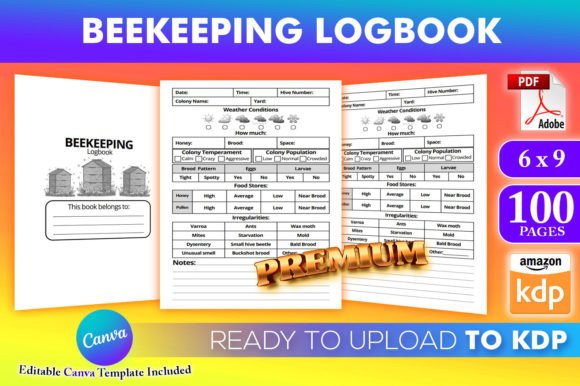
A Beekeeping Logbook KDP Canva Template is more than just a pre-made PDF. It's a customizable framework designed for the 6x9 trim size, tested for KDP's upload system, and editable in Canva—a platform that doesn't require a premium subscription. This accessibility is a major advantage. The core offering typically includes a 100-page interior PDF ready for upload and a Canva template link, granting you the freedom to add, remove, and twist any element. The real interest for beekeepers, educators, and entrepreneurs lies in its dual function: it serves as a professional tool for hive management and a viable product for a KDP side business.
One major misunderstanding is viewing the template as a finished product. It's a skeleton. The design choices you make within Canva—the color scheme, font selection, imagery, and layout of log sections—will define your book's character. A common mistake is to leave the template mostly unchanged, resulting in a generic-looking logbook that fails to connect with a specific audience, whether they are backyard beginners or commercial apiarists.
Critical Mistakes in Customization and Design
The promise of "editable" can lead to a critical oversight: neglecting the needs of the end-user, the beekeeper. A logbook's interior must be functional above all else.
Over-Prioritizing Aesthetics Over Function
It's easy to get caught up in Canva's design tools, adding elaborate graphics and decorative elements. However, cramming pages with non-functional art can reduce the space for actual logging. A beekeeper needs clear, ample areas to record hive inspections, honey yields, pest sightings, and weather conditions. A better approach is to use design to enhance functionality. Use subtle color coding for different sections, employ clean, readable fonts for handwritten notes, and ensure every decorative element serves a purpose, like a simple icon to denote a queen bee check.
Ignoring the Logical Flow of a Beekeeping Season
Many templates provide a basic page layout, but the sequence of those pages is paramount. A mistake is to assume the default page order is optimal. A beekeeping year has a rhythm—from spring buildup to summer honey flow to autumn preparation and winter survival. Your logbook should mirror this. Before finalizing your interior, map out a realistic season. Place seasonal checklists early, ensure harvest records follow peak flow periods, and include winter preparation guides well before the colder months. An illogically ordered logbook feels disjointed and less helpful, reducing its practical value and customer satisfaction.
Technical and Publishing Pitfalls
The "ready to upload" claim is reassuring, but it requires your vigilance.
Not Conducting a Final Print-Reality Check
Even though the files are "tested on KDP," your alterations in Canva can introduce issues. A frequent error is forgetting to check the bleed and margin settings after you've moved elements around. Text or essential borders placed too close to the edge can be cut off in physical prints. Always download your final PDF and view it at 100% zoom, simulating how it will appear as a printed page. Also, verify that any hyperlinks (if you include resource links) are removed, as they are not functional in a print book.
Another overlooked detail is page count. The template may be 100 pages, but your customization might add or remove pages. KDP has specific pricing and printing implications based on page count. Ensure your final PDF's page number is intentional and fits your product's pricing strategy. A 120-page logbook has different production costs than a 80-page one.
Skipping the Audience-Specific Content Review
Who is your logbook for? A beginner might need extensive glossaries, diagrams of hive parts, and step-by-step inspection prompts. A professional might want more advanced data tracking, like detailed pollination service logs or integrated financial sheets for honey sales. Applying the same template generically to both audiences is a misstep. Before publishing, label your intended reader and audit every page. Ask: "Does this section help them?" Remove elements that don't serve your target beekeeper and add ones that do, using Canva's flexibility.
Better Approaches for a Successful Product
To avoid these pitfalls, adopt a methodical, user-centric process.
First, start with content planning. Before even opening Canva, outline the key sections your ideal beekeeper needs. Then, open the Beekeeping Logbook KDP Canva Template and systematically adapt it to your outline. Change the section headers, rearrange pages, and modify prompts. Use Canva's duplicate page function to create consistent log entry pages.
Second, embrace simplicity in design. Choose a palette of two or three primary colors that evoke nature and clarity. Use a highly legible font for body text (like Arial or Times New Roman) and a more stylistic one only for titles. Ensure there is plenty of white space around writing areas. This creates a professional, uncluttered look that invites use.
Finally, perform a multi-stage check. Review for functionality: can you easily envision recording a full inspection on these pages? Review for technical specs: are margins safe, and is the PDF clean? Review for marketability: does the cover design (which you can also create in Canva) and interior look cohesive and appealing to your niche? Getting a second opinion from an actual beekeeper can be invaluable.
What to Check Before Your Final KDP Upload
Your decision to publish should come after verifying these points:
- The interior PDF is exactly 6x9 inches and all content fits within safe margins.
- All pages are in a logical, seasonal order that supports a beekeeper's annual workflow.
- Design elements are supportive, not distracting, prioritizing clean data entry.
- The language and prompts match the knowledge level of your target audience (beginner, intermediate, professional).
- You have utilized the template's flexibility to create a product that feels unique and not like a cookie-cutter copy.
By treating the Beekeeping Logbook KDP Canva Template as a powerful tool rather than a quick-fix solution, you invest in the quality of your final product. This thoughtful approach leads to a more useful logbook for beekeepers and a more competitive, satisfying offering for your KDP business. It turns a downloadable template into a genuinely helpful resource that stands out in the marketplace, building trust with your readers and establishing your authority in this specialized field.